Whether you're using TradingView on your desktop, web browser, or mobile app, signing in with your username and password is a straightforward process. This guide will walk you through each platform step-by-step.
🖥️ 1. Signing In on TradingView Desktop App
Step 1: Open the TradingView desktop app on your PC or Mac and click on the red mic icon in the upper right corner.

Step 2: Click the “Sign In” button in the upper-right corner.
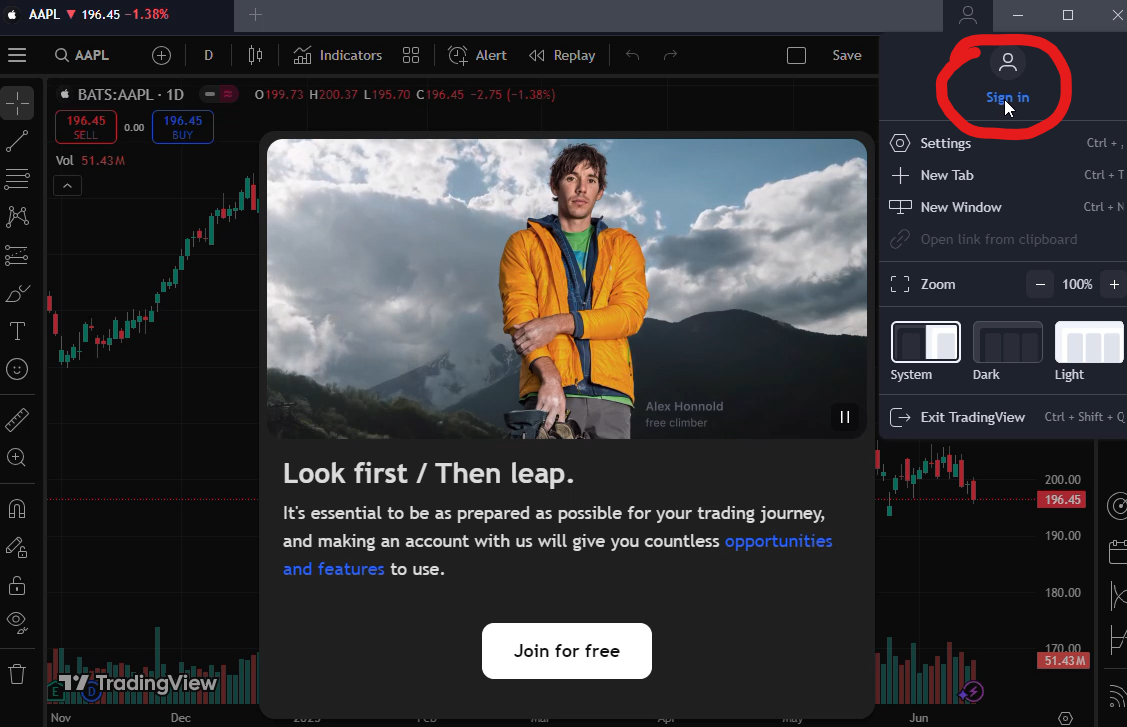
Step 3: click“sign in with browser”.

Step 4: Enter your username or registered email and tap Next.

Step 5: Enter your password, then click Sign In,it will ask you to grant the application access to the account you just log in..

Step 6: tap on always allow and click open tradingview,

✅ You’ll be taken straight to your chart/dashboard.

🌐 2. Signing In on TradingView Web (Browser)
Step 1: Visit www.tradingview.com in your browser.
Step 2: Click “Sign In” at the top right of the homepage.
Step 3: Choose “Continue with Email” (ignore social logins like Google or Apple).
Step 4: Type in your username or email, then press Next.
Step 5: Input your password and click Sign In.
📱 3. Signing In on the TradingView Mobile App (Android/iOS)
Step 1: Launch the TradingView app on your smartphone or tablet.
Step 2: Tap “Sign In” on the welcome screen.
Step 3: Choose “Continue with Email”.
Step 4: Enter your username or email → tap Next.
Step 5: Type in your password → tap Sign In.
📲 You’ll now have access to charts, watchlists, and alerts on the go.
Need help accessing a TradingView account or setting up a subscription in Nigeria and Beyond?
💬 Reach out to Splitly — we’ve got you covered.


